

Chamilo LMS.
The Open Source e-learning platform built to make training easy.
Chamilo LMS is an Open Source learning management system (GNU/GPLv3). Recognized as a Digital Public Good by the Digital Public Goods Alliance. 43M+ user accounts have been created across recorded deployments, according to Chamilo LMS statistics on 10 November 2026. BeezNest, Chamilo LMS publisher, is the main contributor to its development.
Chamilo LMS at a glance
A complete platform for every training challenge.
From producing pedagogical content to tracking individual learners, along with skills management, certification, and results monitoring. No mandatory LMS licence fee. Self-host Chamilo LMS or choose managed hosting in Europe.
Evolving since 2010
The Chamilo LMS you know.
Thoroughly modernized. Always the same spirit.
If you have been using Chamilo for years, you will find your bearings. The pedagogical logic, courses, learning paths, sessions: it is all there, improved. The platform continues to evolve quickly.
2010
Launch of Chamilo LMS (Chamilo 1.x)
BeezNest has been a core contributor to Chamilo LMS since its launch in 2010. Deployed worldwide across education and training organizations.
2015
BeezNest, Chamilo LMS publisher
In 2015, the former Chamilo Association recognized BeezNest as the Chamilo LMS publisher. Project governance transferred to BeezNest Belgium on 1 January 2026. The 1.11 series followed in 2016. BeezNest leads Chamilo LMS development and maintenance, alongside community contributors.
APRIL 2025
Digital Public Good recognition renewedDigital Public Good recognition renewed
Chamilo LMS’s recognition as a Digital Public Good by the Digital Public Goods Alliance was renewed in April 2025.
APRIL 2026
Major architectural overhaulChamilo LMS 2.0 release
A modernized interface (collapsible sidebar menu, one-click view switcher), an included OnlyOffice integration plugin requiring a configured OnlyOffice Document Server, and more options for connections and storage.
Chamilo LMS today
Latest stable releaseChamilo LMS 3.0
A modern, simple and ergonomic platform, with AI assistance that saves trainers time. BeezNest, publisher of Chamilo LMS, supports you at every step: hosting in Europe (France or Belgium), training, a dedicated project manager and migration support. Discover the new generation of Chamilo LMS →
Existing Chamilo LMS platforms can follow documented migration paths, with testing and adaptation where required.
Current interface
A thoroughly modernized interface.
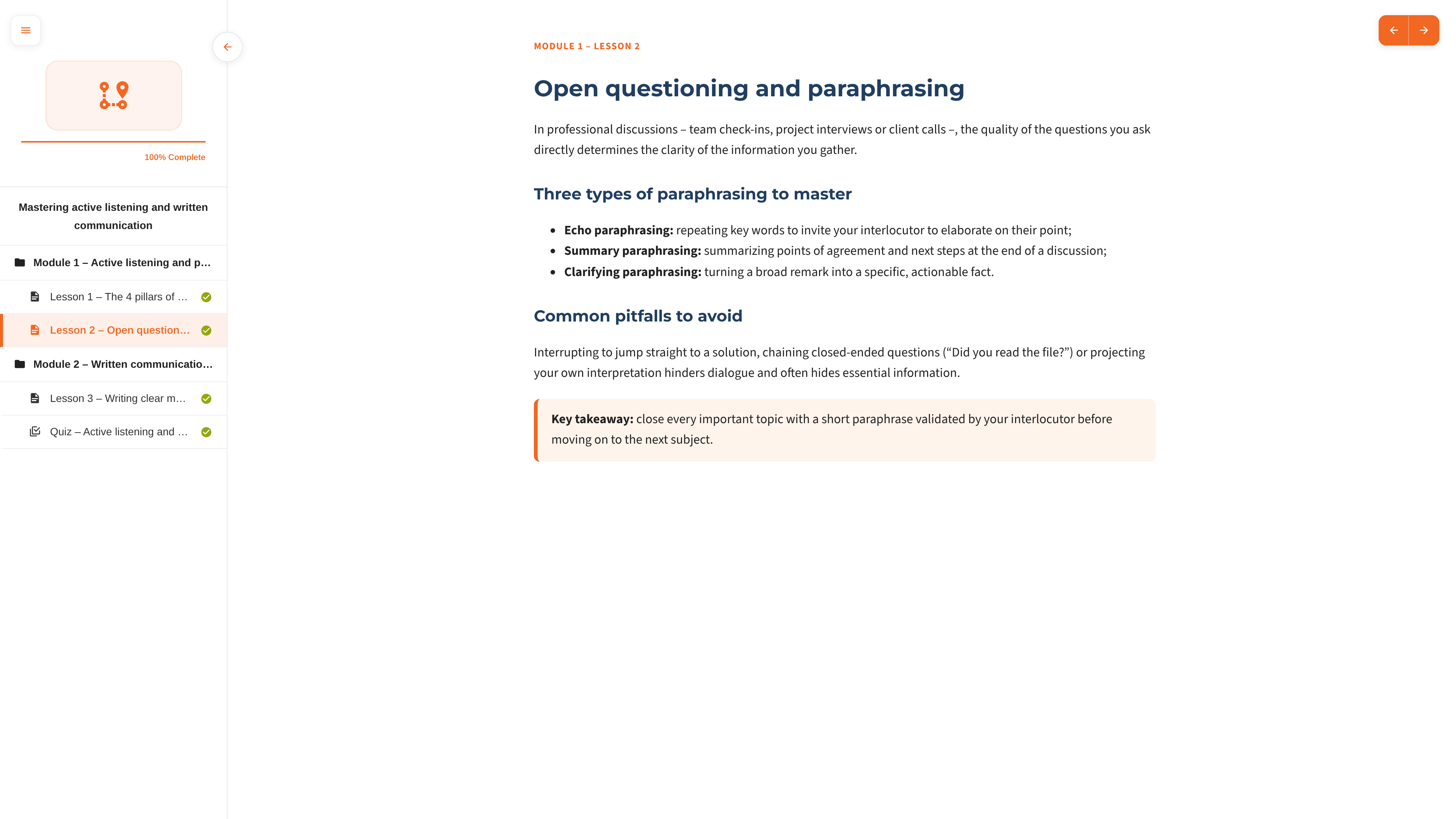
Rebuilt with Vue.js and PrimeVue. A modern, responsive web interface.



Artificial intelligence
AI-assisted features can be enabled for selected courses after administrator configuration.
Chamilo LMS includes configurable AI-assisted authoring, tutoring and assessment features. Choose a supported AI provider, including OpenAI, Google Gemini, Mistral, DeepSeek, Grok or Anthropic Claude. Compatible self-hosted text endpoints require configuration and testing. No separate AI module licence is required for Chamilo LMS. AI-provider usage and hosting costs may apply.
Contextual AI Tutor
An optional contextual AI tutor can assist learners in enabled courses, using the available course context. Availability depends on the configured service. Automatically disabled during exams.
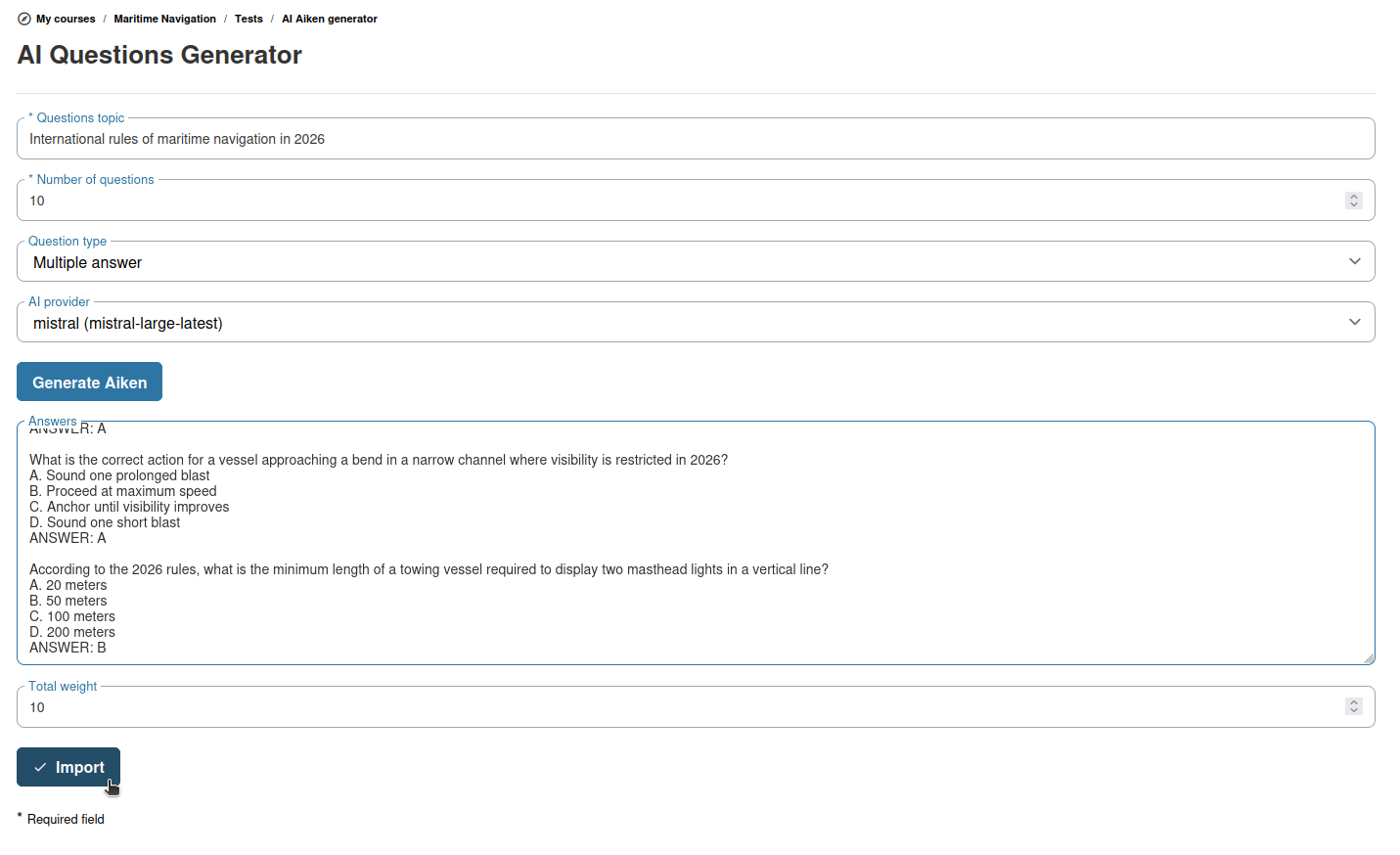
Exercise generator
Generates multiple choice questions and exercises from a topic or existing content. Trainers can review and edit AI-generated questions before adding them to an exercise.
Learning path generator
Generate a text-based learning path from a topic and instructions, then review, edit and reorder its steps before sharing it with learners.
AI Grading
Assisted grading of open-ended assignments. The AI suggests a grade and feedback. The trainer always keeps the final decision.
Glossary generator
Automatically suggests terms and definitions based on the course content. Helps trainers build a consistent reference vocabulary.
Image generator
Generates illustrative images directly from the document editor, without leaving the authoring interface.
Video generator
Request AI-generated video from the authoring interface when a compatible video provider is configured.
Supported AI providers, depending on the enabled feature and model
What our clients appreciate most
Chamilo LMS versus other platforms.
Chamilo LMS combines course-authoring tools with the freedoms of open-source software.
Immediate ease of use
Designed from the ground up to minimize clicks. Designed to help trainers get started with course creation.
Session management
One course, as many sessions as needed. Deploy the same content to different groups with separate calendars and trainers, with no duplication. Learn more →
Native features
Quizzes, learning paths, certificates and reporting are included. Virtual classrooms and selected standards use configurable integrations or plugins. Use supported plugins and maintain both Chamilo LMS and its integrations.
No mandatory license
Released under the GNU GPL version 3 or later, with the freedom to run, study, modify and redistribute the software under its licence terms.
Digital sovereignty
European hosting is available. Chamilo LMS provides configurable privacy tools; GDPR compliance and data transfers depend on deployment, contracts and enabled integrations.
72 languages, natively multilingual
Each user chooses their own language independently. Customizable sub-languages to adapt terminology.
Integrations
Connected to your entire ecosystem.
Connect Chamilo LMS to external systems through its REST APIs and supported standards, with configuration or custom integration where required.
🔗 Standards
- ✓SSO through configured OAuth2 providers, and LDAP authentication.
- ✓SCIM 2.0 user provisioning and LTI 1.3 integration through the included plugins.
- ✓JWT-secured REST API
- ✓SCORM 1.2, partial SCORM 2004 support, and xAPI through the XApi plugin.
🎥 Virtual classrooms
- ✓BigBlueButton integration through the included BBB plugin, with a configured conferencing server.
- ✓Zoom integration through the included plugin, with a configured Zoom service.
🎮 LTI 1.3 tools
- ✓Compatible externally hosted interactive content can be connected through an appropriately configured LTI integration.
- ✓Connect supported external tools after validating their LTI version, licence and configuration.
- ✓LTI 1.3 tools supported by the configured integration, subject to interoperability testing.
☁️ Cloud and storage
- ✓Azure Blob Storage
- ✓Amazon S3
- ✓Google Cloud Storage
Document collaboration
Edit supported office documents within Chamilo LMS through the included OnlyOffice integration and a configured document server.
Authorized trainers and learners can edit supported office documents in the browser through OnlyOffice. Collaboration depends on the document server and access rights. No desktop office suite is required for the supported browser-editing workflow.
A Chamilo LMS specialty
Session management:
a major asset, often decisive.
Reuse a reference course across multiple sessions without duplicating its base content.

Who it's for
An Open Source LMS built for demanding organizations.
The philosophy remains unchanged: Open Source, transparency, sovereignty. With the level of professionalism expected by large organizations.
Going further
What experts appreciate about Chamilo LMS.
More than 15 years of development and feedback from millions of users. Here is what each profile finds in Chamilo LMS.
⚙️ For administrators
✔Multi-URL: several distinct portals on a single installation
✔Extensive configuration grouped into 39 concrete settings schemas.
✔Granular role management: learner, trainer, coach, portal admin, global admin, HR director
✔OAuth2 and LDAP authentication, SCIM user provisioning, and REST APIs for configured integrations.
✔Ticketing system: built-in support for user requests
✔Full-text search: course document indexing via Xapian
🎓 For trainers
✔Drag-and-drop learning paths with prerequisites and learner preview, SCORM 1.2 import and partial SCORM 2004 support.
✔Multiple-choice and open-ended questions, Aiken import, and support for selected QTI 2 question types.
✔Gradebook: weighting, passing threshold, automatic certificates
✔Assignments tool: file submission, grading, and commented feedback
✔Attendance tool: in-person tracking built into the gradebook
✔Sub-languages: terminology customization without changing the base language
📚 For learners
✔Exportable skill badges that can be awarded when configured achievement criteria are met.
✔Customizable certificates: generated upon success, exportable as PDF
✔A calendar showing the course and session events the learner is authorized to access.
✔Social network: exchanges, resource sharing, skills showcasing
✔Multilingual interface: each learner chooses their own language independently
✔Course catalog: browsing and enrolling in available courses
This list is not exhaustive. If you are unsure about a specific feature, ask BeezNest directly: we will give you a precise answer. Contact us →